> For the complete documentation index, see [llms.txt](https://wiki.pokeclash.com/llms.txt). Markdown versions of documentation pages are available by appending `.md` to page URLs; this page is available as [Markdown](https://wiki.pokeclash.com/features/claiming.md).
# Claiming
## Claiming Guide
### Creating a claim
To first create a claim, use the golden shovel provided in your first join kit and click two opposite corners of your build with it to create your claim. If you use the golden shovel to create a claim then you have to look that the claim is at least 10x10 blocks, else it will not work. Everything in this claim is protected from outsiders.
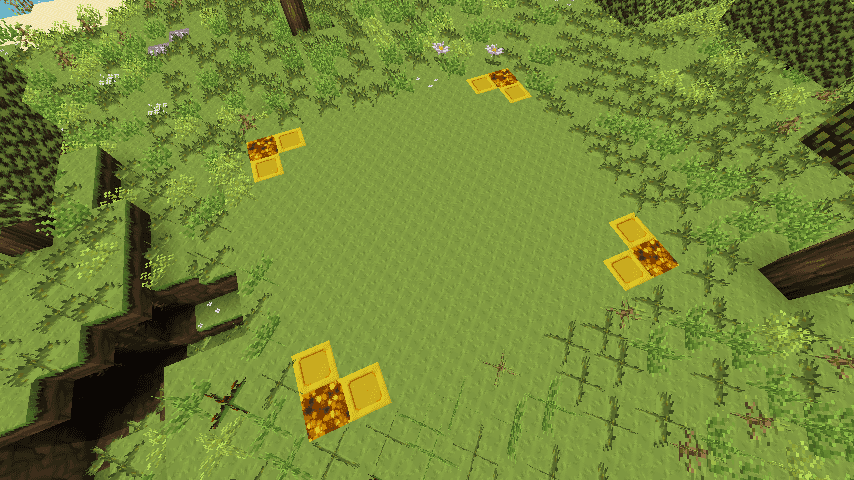
To see the outline of your claim, simply tap any block inside of your claim with a stick and you will see a corner outline of gold and glowstone as shown in the picture above.
Our claiming system uses your in-game PokeDollars balance to create each claim, so make sure you have enough money!
### Trust a player
To grant someone the permissions to build and interact with anything in your claim you have to use the command `/trust [Player]` while you are in your claim. If you run the command in the outside then the player get trusted in all your claims. It is also possible to revoke the permissions, for this you have to use `/untrust [Player]`. Remember, trusting someone gives them access to your entire claim, including chests and other storage things as well!
### Deleting a claim
You can delete one claim or all claims. To delete a claim you have to stand in the claim and use the command `/abandonclaim`, use it again to confirm it. If you want to delete all your claims you need to use the command `/abandonallclaims` and use the command again to confirm it.
### Commands
* `/trust [Player]` - Gives the player permissions to build
* `/trustList` - Lists all trusted players
* `/untrust [Player]` - Revokes any permissions of the player
* `/claiminfo` - Displays general info about the claim you are standing in. 1.10+ only
* `/claimlist` - Displays all claims you have access to. 1.10+ only
* `/abandonclaim` - Deletes the claim you're standing in.
* `/abandonallclaims` - Deletes all of your claims.
* `/accesstrust [Player]` - Gives a player permission to use your buttons, levers...
* `/containertrust [Player]` - Gives a player permission to use and open everything.
* `/untrustall` - Removes all permissions for all players in your claim.
* `/subdivideclaims` - Switches your shovel to subdivison mode, so you can subdivide your claims.